He was our closing keynote, pacing the green room and physically waving away the AV tech holding a lavalier microphone.
“I don’t need it,” he said, tapping his chest. “I project. I’ve got a booming voice. I’m loud enough.”
I stood by the doorway, feeling my pulse spike. I watched my entire inclusion strategy crumble against one guy’s ego. He didn’t realize that his “booming voice” wouldn’t feed directly into the auditorium’s assistive listening loops. He didn’t know our live captioning software would turn room echo into a scrambled mess on the big screen. He didn’t realize that with the World Health Organization estimating over 1.5 billion people globally live with hearing loss, dozens of attendees in our audience were about to be completely shut out of his session.
For years, I treated accessibility like a series of ad-hoc favors. A temporary ramp here, an interpreter booked at the last minute there, a desperate plea to a speaker to please just use the microphone. It was exhausting, highly reactive, and ultimately, it failed the attendees who needed our advocacy the most.
Heading into 2026, good intentions are no longer a viable event strategy. Inclusion has to be mathematically engineered into your floor plan before the first ticket is ever sold. To stop reacting to crises and start designing equitable spaces, I mapped out every physical and digital friction point from the public transit stop to the main stage. If you’re done crossing your fingers and hoping for the best, this accessible event checklist is the exact blueprint you need to build a system that doesn’t break.
Structuring the Inclusive Attendee Journey: From Registration to Venue Navigation
Inclusion starts at the digital front door months before an attendee crosses the physical threshold. If onboarding is broken, the on-site experience never happens.
Effortless Registration and Pre-Event Diagnostics
I once spent twenty minutes fighting an event form. Mandatory fields were marked only by a pale red outline, and a pop-up calendar completely trapped my keyboard-only navigation. I simply closed the tab.
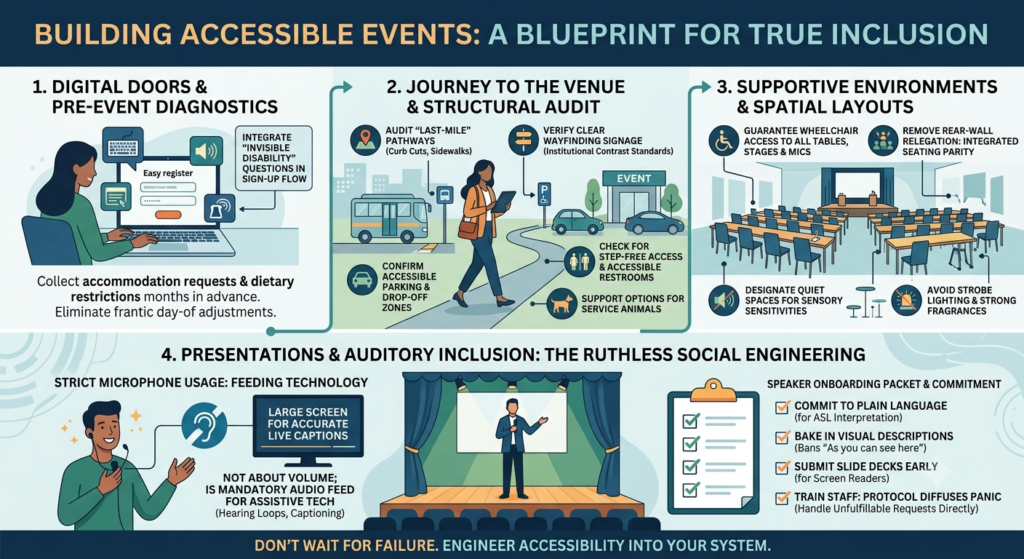
That drop-off is the invisible cost of poor UX. Smooth registration is the baseline for an inclusive design that respects neurodivergent and screen-reader users. To fix this, I started adding “invisible disability” questions directly into the initial sign-up flow. This system securely captures vital accommodation requests and specific dietary restrictions months before I finalize vendor contracts. Gathering this data early isn’t just good hospitality; it is a critical workflow that eliminates frantic day-of adjustments and ensures nobody is excluded before the event even begins.
Navigating the Last-Mile Transit and Structural Layout
Securing an accessible venue is only half the equation. The “last-mile” logistics dictate whether an attendee actually reaches your front door. The gap from public transportation drop-offs to the registration desk is riddled with blind spots.
Now, I audit every last-mile pathway months in advance. I walk the route from the bus stop to the registration desk just to look for missing curb cuts and verify clear wayfinding signage. Before finalizing an accessible venue, I review every detail, including accessible parking, the drop-off zone, and all paths of travel from entrances to event spaces. I also confirm that there are accessible restrooms, step-free access, clear signage, and support options for service animals, including a dog relief area when needed. I no longer guess on accessibility metrics. Instead, I anchor my operations in rigorous institutional standards.
To give you an idea of what that looks like in practice, here is how I map my event protocols to established university benchmarks:
| Accessibility Feature | The “Guesswork” Approach | The Institutional Benchmark |
|---|---|---|
| Physical and Digital Signage | Printing standard signs and hoping they are legible from a distance. | Adopting Cornell University’s visual standards, which require a strict 4.5:1 color contrast ratio for all digital and physical text. |
| Emergency Evacuation | Relying solely on standard auditory fire alarms. | Implementing the University of Chicago’s protocol: capturing self-identification data in advance to create personalized evacuation plans for individuals who cannot use stairs or hear standard alarms. |
By adopting these exact standards, I replace assumptions with structural guarantees, ensuring every external pathway is predictably safe before the first guest arrives.
Designing Supportive Environments and Spatial Layouts
During a recent summit, I watched an attendee using a mobility device get relegated to the back wall. The networking session featured exclusively high-top rounds, completely ignoring accessible table height and physically cutting them out of the conversation.
I never want to repeat that mistake, so I now design the room so a wheelchair user can reach any table, stage, or microphone without having to ask for help. This means providing clear, unobstructed wheelchair access at every engagement point. Inside the venue, I reduce strobe lighting effects and establish designated quiet spaces away from high-traffic corridors to support guests with sensory sensitivities.
In the main hall, I provide diverse seating options—mixing low tables, removing chairs for device parking, and utilizing wider aisle profiles to guarantee absolute seating parity. Inclusion is not a checklist of minimum clearances. I engineer the room so every single guest commands the exact same proximity to the power.
I also consider environmental comfort by providing quiet spaces, wellness spaces, adjustable lighting, and accessible electrical outlets. Avoiding strobe lights and strong fragrances helps create a more welcoming environment for attendees with sensory sensitivities. After each event, post-event feedback and an accessibility audit help identify areas for improvement.
Orchestrating Accessible Presentations and Stage Dynamics
I used to think that booking a venue with physical ramps and ordering a few podium mics meant I had successfully checked the accessibility box. I was entirely wrong. Structural parity begins with stage equity—presenters using mobility devices must access the platform from the same primary sightline as able-bodied speakers—but physical access is only half the equation. True inclusion requires the ruthless social engineering of your speakers and event staff.
Engineering the Auditory Experience
The auditory experience requires strict behavioral enforcement. At last year’s keynote, I actually had to block the stage stairs when a booming-voiced presenter tried to wave off the lapel mic, insisting, “I project well enough!”
I refused to let him walk out unamplified. I reminded him that strict microphone usage isn’t about room volume. It is the mandatory audio feed driving our assistive technology, like hearing loops, and allowing off-site transcriptionists to do their jobs. Without that direct feed, auditory inclusion completely collapses. This is why I coordinate accessibility tools such as hearing loop systems, ASL interpreters, and other assistive technology before the event begins. Providing accessible communication also means preparing alternative formats, including large print and braille materials when required. Consider the reality of your audience: roughly one in six adults experiences hearing trouble. Beyond that, a massive study found that 80 percent of people who rely on live captioning aren’t even hard of hearing—they simply need the text to process information in a distracting environment. My rule is simple now: give them the mic, or cut their audio entirely.
Delivering Inclusive Content
Accessible presentations aren’t built on the stage. I have to secure them weeks before the doors open. To guarantee flawless event execution, I send out a mandatory Speaker Onboarding Packet and treat it as a hard operational requirement.
To make expectations completely clear, I broke down the requirements into a straightforward checklist for my speakers:
| Speaker Requirement | The Accessibility Impact |
|---|---|
| Commit to plain language | Allows our ASL interpreters to accurately translate complex industry jargon in real-time without falling behind. |
| Bake in visual descriptions | Bans the lazy phrase “As you can see here.” Speakers must audibly detail the exact data points shown on screen for blind or low-vision attendees. |
| Submit slide decks early | Gives our production team the necessary lead time to generate accessible alternative formats for guests relying on screen readers. |
When you put the logistical burden on the speakers early, pre-event compliance naturally dictates your on-site success.
Navigating On-Site Friction
Even when I meticulously plan the space so it can be accessed, understood, and used to the greatest extent possible by all people—the core definition of universal design—friction still happens.
I still remember the absolute panic I felt at a Seattle summit when an unannounced attendee arrived at the registration desk requesting a specialized tactile interpreter I hadn’t booked. Panic elevates stress, but I’ve learned that protocol diffuses it. Rigorous staff training ensures floor managers don’t just apologize helplessly; they adapt and solve the problem.
To handle this, I implemented an “Uncomfortable Conversation Protocol” to manage unfulfillable requests on-site. Instead of getting defensive, I name the service gap directly: “I am so sorry, but we did not secure that specific accommodation today.” Then, I immediately offer the closest accessible communication alternative, such as dedicating a one-on-one guide for the afternoon or providing an expedited digital transcript of the sessions.
I never want to make a guest feel like a burden for exposing my logistical blind spots. I am still learning to bridge every gap, but true inclusion requires navigating uncomfortable realities face-to-face, never hiding behind corporate policy.
The view from the soundboard
At my last summit, I stood at the back of the auditorium and watched our opening speaker walk out to center stage. Before she said a single word, she tapped the lavalier mic clipped to her collar, waited for the green light on the downstage monitor to signal the live captioner was ready, and only then took a breath to speak.
There was no green room debate. No frantic hand gestures from the AV team. No relying on a “booming voice” to reach the back row.
When you build a comprehensive accessible event checklist into your fundamental operating system, you remove the friction of human ego and oversight. You stop treating attendee inclusion as a last-minute patch and start treating it as the baseline standard of professional hospitality.
Don’t wait for an attendee to send a frustrated email pointing out where you failed. Use this framework, engineer the blind spots out of your floor plan, and build an event where every single person who buys a ticket actually gets a seat at the table.